
What is an ONT?
The ONT, or Optical Network Terminal, is the device that connects your local network to Sonic’s fiber optic network. Similar to the modem used by Cable and DSL connections. While Sonic uses several models of ONT, each ONT will have several core features- a power input, a Fiber Optic Input and Ethernet and Phone Jack output. ONTs do not have included Wi-Fi or network routing capabilities, so you will need either to rent a Wi-Fi router or gateway from Sonic or purchase your own.
1G Fiber ONTs
Adtran 411
Light Indicators (Top to Bottom)
- Voice - This indicator will go solid green when the voice line is in use.
- LAN - The LAN light will blink to signal an active connection.
- Fiber - This light will be solid green while the Fiber connection is established. If the light is blinking green, it is in the process of connecting. If the light is off, the ONT is not making the connection. If the LED is switching from green to red, then light levels are far below what they should be.
- Power - This indicator will go solid green when the voice line is in use.
Ports
- Fiber - The Fiber Optic Cable. Note: Avoid unplugging this as dust or debris can impact performance.
- Power - 12V Power Cable port for electrical power.
- Voice - Standard phone jack that will support touch-tone phone.
- LAN - Ethernet port to connect ONT to your Router.
Adtran 601qv
LED Indicators (Left to Right)
- LAN - Indicates activity/communication between ONT and Local network.
- Voice - Indicates the ONT has active Phone Service
- Fiber - Indicates Fiber Connection. Solid green means Fiber connection is established. Red indicates connection has failed.
- Power - Indicates ONT is receiving power.
Ports
- Optical (Green) - The Fiber Optic Cable. Note: Avoid unplugging this as dust or debris can impact performance.
- Ethernet - Ethernet port to connect ONT to your Router.
- Voice - Standard phone jack that will support touch-tone phone.
- UPS - Power Connection for Battery Back-Up.
- Power - 12V Power Cable port for electrical power.
10G Fiber ONTs
Adtran 622v
Indicator Lights (Left to Right)
- Power - Indicates ONT is receiving power.
- Fiber - Indicates Fiber Connection. Solid green means Fiber connection is established. Red indicates connection has failed.
- 10GE/1GE LAN - Indicates activity/communication between ONT and Local network. Flickers green if connection is actively transmitting traffic. NOTE: The 1GE Port is disabled and should not be lit.
- Phone 1/Phone 2 - Lights up when phone service is in use.
Ports
- Optical (Green) - The Fiber Optic Cable. Note: Avoid unplugging this as dust or debris can impact performance.
- POTS 1/2 - Standard phone jack that will support touch-tone phone.
- GE/10GE - Ethernet port to connect ONT to your Router. NOTE: GE port is disabled; use the 10GE port to connect to your local network.
- Reset - For factory resetting the ONT.
- Power - 12V Power Cable port for electrical power.
- On/Off - Powers ONT On and Off.
Adtran 632v
Indicator Lights (Left to Right)
- Voice - Indicates ONT is receiving power. Solid Green when phone is ringing, Flashing Green when phone is off the hook.
- 10GE/2.5GE - Indicates activity/communication between ONT and Local network. Flickers green if connection is actively transmitting traffic. NOTE: The 2.5GE Port is disabled and should not be lit.
- Optical - Indicates Fiber Connection. Solid green means Fiber connection is established. Red indicates connection has failed.
- Power - Indicates ONT is receiving power from the socket.
Ports
- Optical (Green) - The Fiber Optic Cable. Note: Avoid unplugging this as dust or debris can impact performance.
- Voice - Standard phone jack that will support touch-tone phone.
- 10GE/2.5GE - Ethernet port to connect ONT to your Router. NOTE: GE port is disabled; use the 10GE port to connect to your local network.
- Reset - For factory resetting the ONT.
- Power - 12V Power Cable port for electrical power.
- UPS - Port for Battery Backup
- On/Off - Powers ONT On and Off.
Adtran 822v
Indicator Lights
- Power - Indicates ONT is receiving power.
- Fiber - Indicates Fiber Connection. Solid green means Fiber connection is established. Red indicates connection has failed.
- 10GE/1GE LAN - Indicates activity/communication between ONT and Local network. Flickers green if connection is actively transmitting traffic. NOTE: The 1GE Port is disabled and should not be lit.
- Phone 1/Phone 2 - Lights up when phone service is in use.
Ports
- WAN - The Fiber Optic Cable. Note: Avoid unplugging this as dust or debris can impact performance.
- 12V - 12V Power Cable port for electrical power.
- UPS - Power Connection for Battery Back-Up.
- Phone 1/2 - Standard phone jack that will support touch-tone phone.
- GE/10GE - Ethernet port to connect ONT to your Router. NOTE: GE port is disabled; use the 10GE port to connect to your local network.
- Reset - For factory resetting the ONT.
Other ONTs
IPhotonix 7251
Indicator Lights (Left to Right)
- Power - Indicates ONT is receiving power.
- Battery - Glows steady green when the external battery or UPS is charged and the unit is operating on external power.
- Fail - Glows red to indicate Loss of Signal.
- ETH 4-1 - Glows green when Ethernet connection is operational.
- POTS - Lights up when phone service is in use.
- MGMT - Unsupported
- WLAN - Unsupported
Ports
- On/Off - Powers ONT On and Off.
- PWR - 12V Power Cable port for electrical power.
- UPS - Unsupported.
- POTS1/ POTS2 - Standard phone jack that will support touch-tone phone.
- ETH1-4 - Ethernet port to connect ONT to your Router.
- CATV - Unsupported
- Fiber Optic - The Fiber Optic Cable. Note: Avoid unplugging this as dust or debris can impact performance.
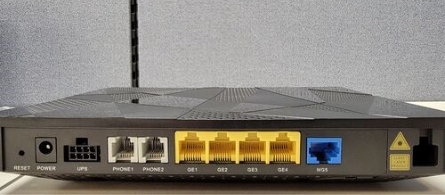
TiBiT WAG-052C
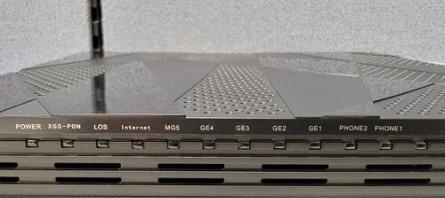
Indicator Lights (Left to Right)
- Power - Indicates ONT is receiving power.
- XGS-PON - Indicates Fiber Connection.
- LOS - Glows to indicates Loss of Signal.
- Internet - Unsupported
- MG5 - Glows when Ethernet connection is operational.
- GE4-1 - Glows when Ethernet connection is operational.
- POTS2/POTS1 - Phone Service.
Ports
- Reset - For factory resetting the ONT.
- Power - 12V Power Cable port for electrical power.
- UPS - Unsupported.
- Phone1/Phone 2 - Standard phone jack that will support touch-tone phone.
- GE1-4 - Gigabit Ethernet ports to connect ONT to your Router.
- MG5 - Multi-Gigabit Ethernet port to connect ONT to your Router.
- Fiber - The Fiber Optic Cable. Note: Avoid unplugging this as dust or debris can impact performance.
Radisys IE6101B
Indicator lights
- Off - ONT is powered off.
- Blue Solid - ONT is online and connected.
- Blue Blinking - ONT is still connecting.
- Blue slow blink - Phone line active.
- Red - ONT is not receiving signal from the fiber
Amber - Factory Reset
Ports (Left to Right)
- On/Off - Powers ONT on and off.
- Power - 12V Power Cable port for electrical power.
- Phone - Standard phone jack that will support touch-tone phone.
- Reset - For factory resetting the ONT.
- 10GE LAN - Ethernet port to connect ONT to your Router.
- XGS-PON - The Fiber Optic Cable. Note: Avoid unplugging this as dust or debris can impact performance.